Online Kabaddi Scoreboard
Kabaddi is a contact team sport most Europeans never heard of, with roots in ancient India, now followed by huge audiences across South Asia. Two teams of seven take turns sending a raider into the opposing half to touch (tag) defenders and return home, all in a single breath, while the defenders try to hold the raider back. The Wikipedia kabaddi article explains the history and the regional styles, and India's Pro Kabaddi League is the format most broadcasts follow today. This score counter is tuned to that standard match: two 20-minute halves, two team scores and a 30-second raid clock.
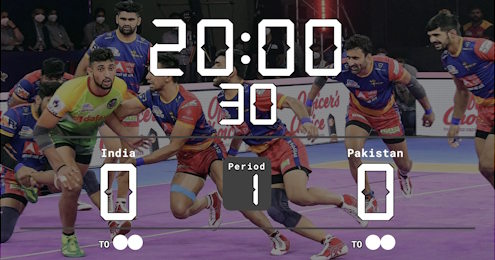
Scoreboard Setup
The preset runs a count-down timer over two 20-minute halves with a running score for each team. The 30-second raid clock uses the same shot-clock setting as the basketball shot clock (and matches water polo's 30-second possession clock): start it when the raider crosses the midline, and reset it for the next raid. Tap a team's score to add raid points, tackle points or bonus points, and add two points (+2) when a side is all out, just like how you add 2 points in basketball. Each team gets two timeouts, tracked as dots on the score counter.
Rules at a Glance
Run the Board From the Admin Preview
The admin page shows a live preview of the scoreboard with click controls baked into every active section, so a full game can be driven from the preview alone, without going back to the side panel.
Anything that reacts to a click turns the cursor into a pointer and brightens on hover, so the interactive zones are obvious without trial and error. Press the Full Screen button on the admin page to hide every panel except the board itself. A small floating toolbar stays pinned at the bottom of the screen with a fullscreen toggle marked F11, zoom out, a reset-zoom button showing the current percentage and the Ctrl -/+ hint, zoom in, and a close button. The same laptop now doubles as the venue display while the operator keeps driving the game through the preview clicks. The site logo at the top left always links back to the home page, so you can jump between match, tournament or standings tools without losing your place.
FAQ
Does the board track raids automatically?
No, the referee calls the play. Use the scoring buttons to add raid, tackle and bonus points as they are awarded, and the raid clock to time each raid.
Can I run a 2 × 15 minute youth format?
Yes. The half length is editable when you create the board, so you can set shorter halves for school or youth matches.
How do I handle an all out?
Add two points to the scoring team by hand. The board keeps a simple running total, so any scoring rule your competition uses is supported.
Can spectators follow live?
Yes. Every board has a public live broadcast URL that updates in real time. Share it, cast it to a venue screen, or drop it into a stream overlay.