Scoreboard Leaderboard

You can add or remove rows later from the admin page.

Pick a preset or edit columns below. Points = sum of each column's value × its points multiplier.

Label Key Step Pts×

Label is the short header shown on the board (e.g. W). Key explains what the label stands for and appears as a tooltip on hover (e.g. Wins). Step is the +/− amount. Pts× is how much each unit contributes to the total Pts column.

Use selectors like .st-board, .st-row, .st-title, .st-cell--pts.

Set up columns and appearance, then create the standings.

Live League Standings Table Generator

A free online league table generator with live broadcast feature for football, rugby, basketball, office leagues, office pools, and any other competitio. Define your columns, choose how each column contributes to the total points, and share a single live link. Every viewer sees updates within a second of you pressing a button. For format background, the Wikipedia league table article walks through the columns and tiebreakers, and the round-robin tournament article covers the underlying format.
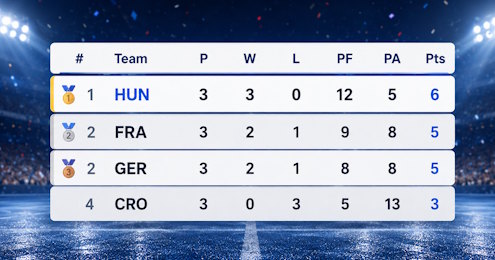
ScoreCounter league standings table ranking teams by points, wins, draws and losses with a live broadcast link
Online standings generator: live league table with custom columns and points, shared by link
Up to 64Teams
Up to 16Columns
LiveShare Link
0 £Forever Free

How the Points Column Works?

Each column you add has a Pts× multiplier. When the admin bumps a cell, the Points column recalculates as ∑ (value × multiplier) across every column for that team. A football preset, for example, ships with W × 3 and D × 1; a rugby preset uses W × 4, D × 2, and a bonus-point column at BP × 1. Set a column's multiplier to 0 and it becomes a display-only stat such as Played matches, Goals For, or Goals Against. These are displayed on the scoreboard, but not fed into the Points total.

Using The Builder

1. Pick a preset or start blank - Football (3-1-0), Rugby (4-2-0 + BP), Basketball (2-1), or Simple W/L. Presets fill the columns editor so you can still rename labels, change steps, or remove columns you don't need.
2. Edit the columns - Each row in the editor is Label | Key | Step | Pts×. The Label is the short header shown on the board (e.g. W), the Key is the full name that appears as a tooltip on hover (e.g. Wins), the Step is how much the +/− buttons move the cell, and the multiplier decides how that column contributes to Points.
3. Pick a sort - Sort by the computed Points total, or by any individual column (Wins, Goals For, Losses ascending for a fewest-losses ladder, etc.). Toggle Auto-sort off and the roster stays in the order you typed it, which is useful for seeded groups or fixed divisions.
4. Create and share - You get an admin link (keep private) and a live link (share anywhere) with your score counter. Open the admin from a phone to update stats on the move; open the live link on a projector or OBS browser source.

The Admin Page

+ / − per cell - Every stat cell has its own step buttons. Click + under W to record a win and Points bumps by the column's multiplier; click + under GF to log a goal without touching Points.
Direct entry - Type into any cell to set it to an exact value. Useful for importing a mid-season table or correcting a mistake without undoing step by step.
Undo - Every stat change stores the previous roster once, so you can roll back the last edit if tapped the wrong column.
Reset stats - Makes every cell 0 for every team while keeping the team names and column setup intact. Useful when starting a new season or round-robin.
Add / remove rows - Rows go up to 64 and down to zero. New rows start with all stats at zero on the current column set.
Edit settings - Jumps back to the builder pre-filled with the current stanfdings, so you can add a column, change a multiplier, or re-theme without recreating the link.

On the live page

Real-time - Updates arrive over a server-sent events stream. A change on the admin appears within a second on every viewer's screen with no refresh.
Fullscreen - One button in the corner. Use it when the board is on a TV, projector, or a dedicated monitor at the venue.
Themes and Custom CSS - Ten built-in themes plus full CSS override, so the board can match a club site, a stream overlay, or corporate branding. Selector names are .st-board, .st-row, .st-title, .st-cell--pts.
Resilient - If the stream drops, the live page falls back to polling every few seconds, so a flaky network still keeps the board current.

Common setups

Football / soccer league - Use the Football preset. P / W / D / L / GF / GA with Pts computed as W×3 + D×1. Sort by Pts; break ties visually with the GF and GA columns.
Rugby league or union - Rugby preset gives W×4, D×2, plus a bonus-point column (BP×1). Add a try-difference column with multiplier 0 if you want it on the board without feeding points.
Basketball round-robin - Basketball preset. W×2, L×1 (some leagues award a point for showing up). Add PF / PA columns at multiplier 0 for point differential.
Office or classroom league - Simple W/L preset plus any custom column (Deals, Bugs, Laps, etc.). Set the multiplier to weight that column's contribution to the total.
Golf-style fewest-wins - Toggle sort to ascending and sort by a column like Penalties or Strokes instead of Pts. Teams with the lowest value rise to the top.

FAQ

Can I change the columns after the season starts?

Adding a column creates it filled with zeros for every team. Removing a column drops its values - the remaining columns keep their data, and Points recalculates from the current column set.

How many people can watch the live link?

Unlimited viewers. Each one subscribes independently to the live stream.

Does it work as an OBS overlay?

Of course it supports Open Broadcaster Software. Add the live URL as a browser source. Use Custom CSS (or one of the demo styles) to match the stream layout.

What happens if I lose the admin link?

The admin link contains the edit key, so without it a standings table becomes read-only. Save the link somewhere safe when you create it, or just create a new one with the same settings.

Build your league tablePick a preset, add the teams, and the standings update live for every viewer. For a simpler single-column ranking use the leaderboard. For knockout play, switch to the tournament bracket.
Create standings table