Squash Scoreboard with Live Broadcast
Squash 🧱🎾 is a fast-paced racquet sport played in an enclosed 6.4 × 9.75 m court with four walls. Two players take turns hitting a small rubber ball against the front wall above the tin, the ball being allowed to bounce once on the floor between shots. The full-bodied workout and tactical depth has made squash a fixture of clubs and PSA World Tour events worldwide. Background on PARS and English scoring is in the Wikipedia squash article; the world body is the World Squash Federation.
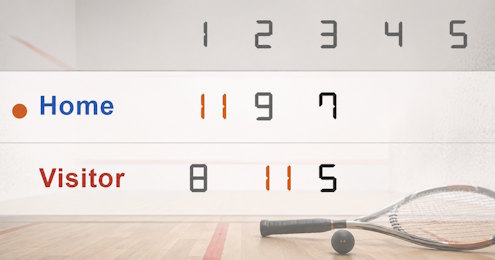
Scoreboard Setup
This squash score counter configures sets to 11 points with must-win-by-2 checkbox enabled and a best-of-5 format - the PARS (Point-A-Rally-Scoring) format used across the PSA World Tour, World Squash Federation events, and most national leagues since the late 2000s. For doubles or older club formats, switch the points-to-win to 9 or 15 and disable must-win-by-2 for sudden-death endings at the cap.
Main Rules of Squash
Run the Board From the Admin Preview
The admin page shows a live preview of the match scoreboard with click controls baked in, so a full match can be scored from the preview alone:
Anything that reacts to a click brightens on hover, so the interactive zones stand out. Press the Full Screen button on the admin page to hide every panel except the board itself. A small floating toolbar stays pinned at the bottom of the screen with a fullscreen toggle marked F11, zoom out, a reset-zoom button showing the current percentage and the Ctrl -/+ hint, zoom in, and a close button. The same laptop now doubles as the venue display while the operator keeps driving the match through the preview clicks. The site logo at the top left always links back to the home page, so you can jump between tournament, standings or leaderboard tools without losing your place.
FAQ
Can I switch back to the older 9-point hand-out scoring?
Sure. Set the points-to-win to 9 and disable must-win-by-2 for sudden death at the cap. The serve indicator can be flipped manually as service follows the older hand-out rule.
Can I use it for doubles?
Yes. Enter the two pairs in the player fields. Doubles squash is governed by the WSF and uses the same PARS scoring with slight court differences.
Does it record let / stroke decisions?
No - the board tracks the score, not the call. The referee or marker calls let, stroke or no-let; you simply add or hold the point on the board accordingly.